ArtisMail

Mail for iPhone and iPad

Your mail server.
Your phone.
Nothing in between.

ArtisMail connects straight to the IMAP and SMTP servers you set up. No analytics, no tracking, no account with us, and no server of ours reading along.

Download on the App Store Free with one account. Everything in Pro is open for the first 14 days.

Not a mail service. Not a cloud. Not a subscription. Not an AI assistant. See everything it is not

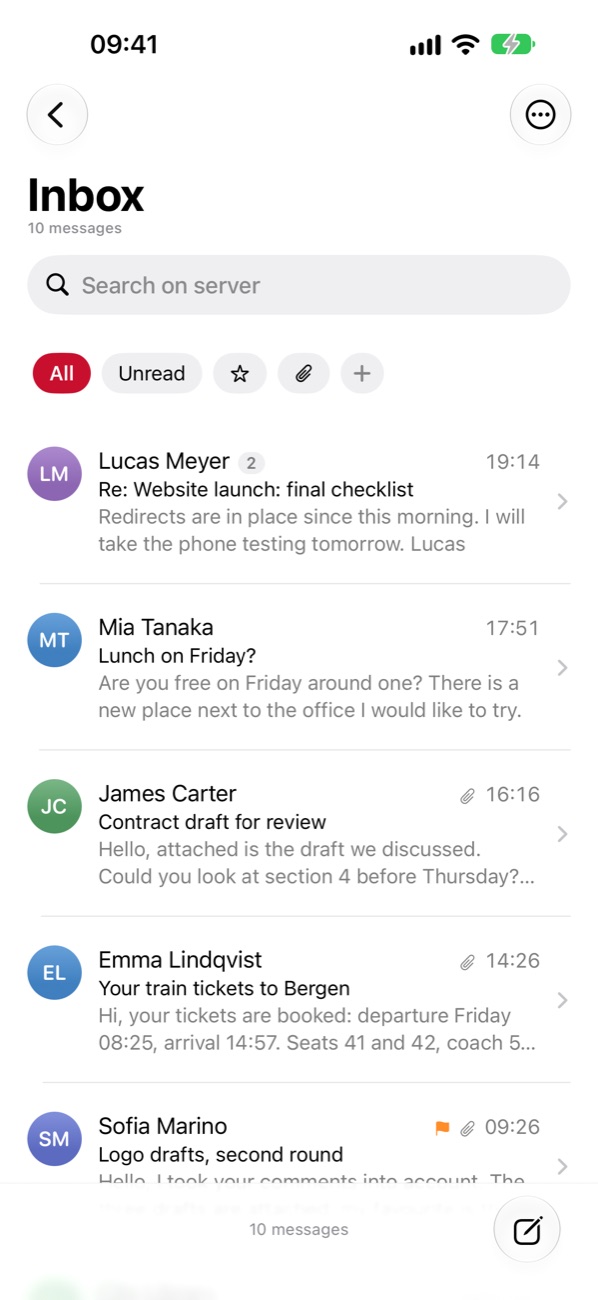
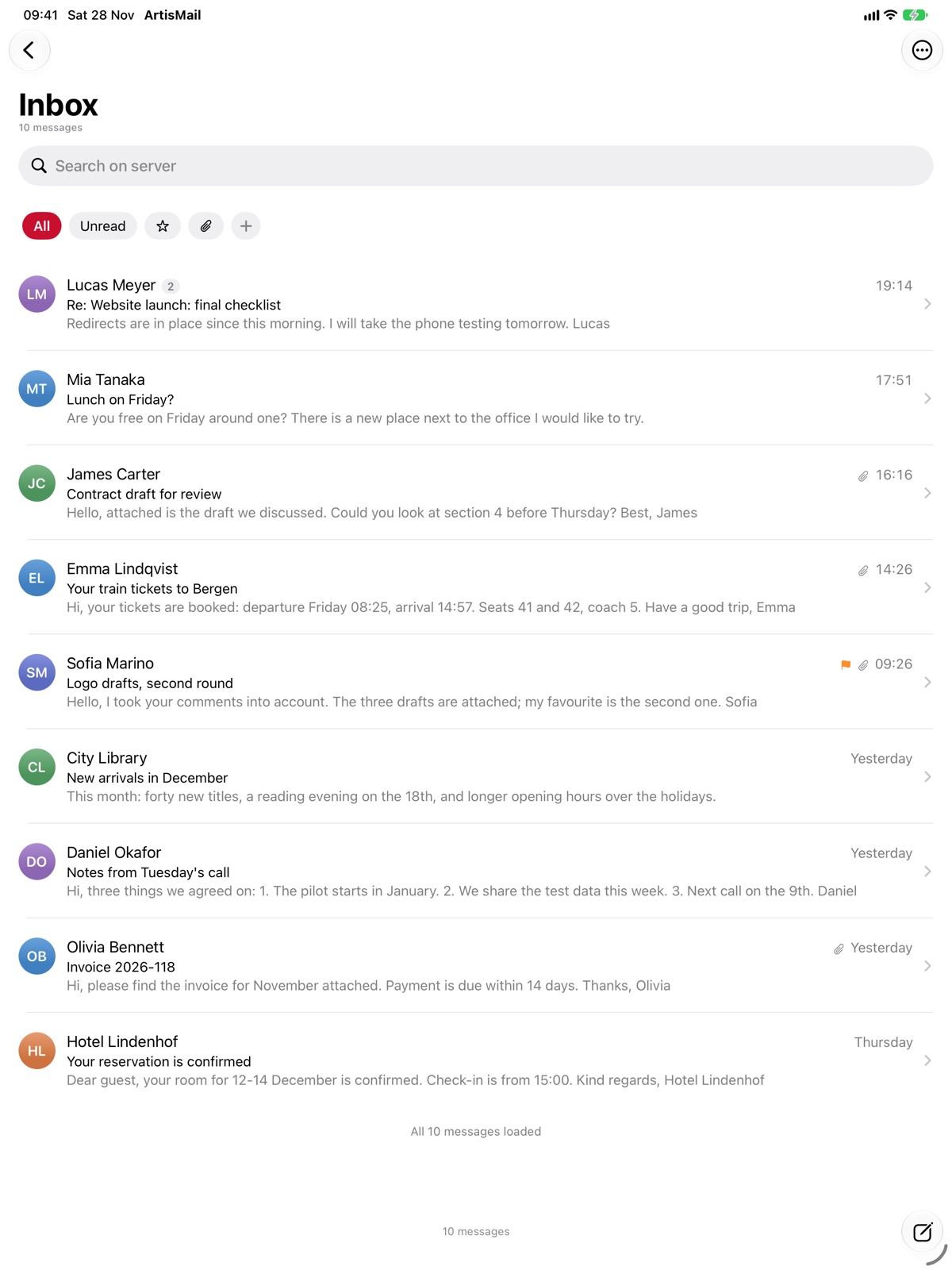
The ArtisMail inbox: conversations with sender, subject and a preview, and tabs for unread, starred and attachments

What ArtisMail is not

0analytics or tracking SDKs
0servers of ours between you and your mail
0accounts to create with us
1payment for Pro, once

Everything you do with mail, done well

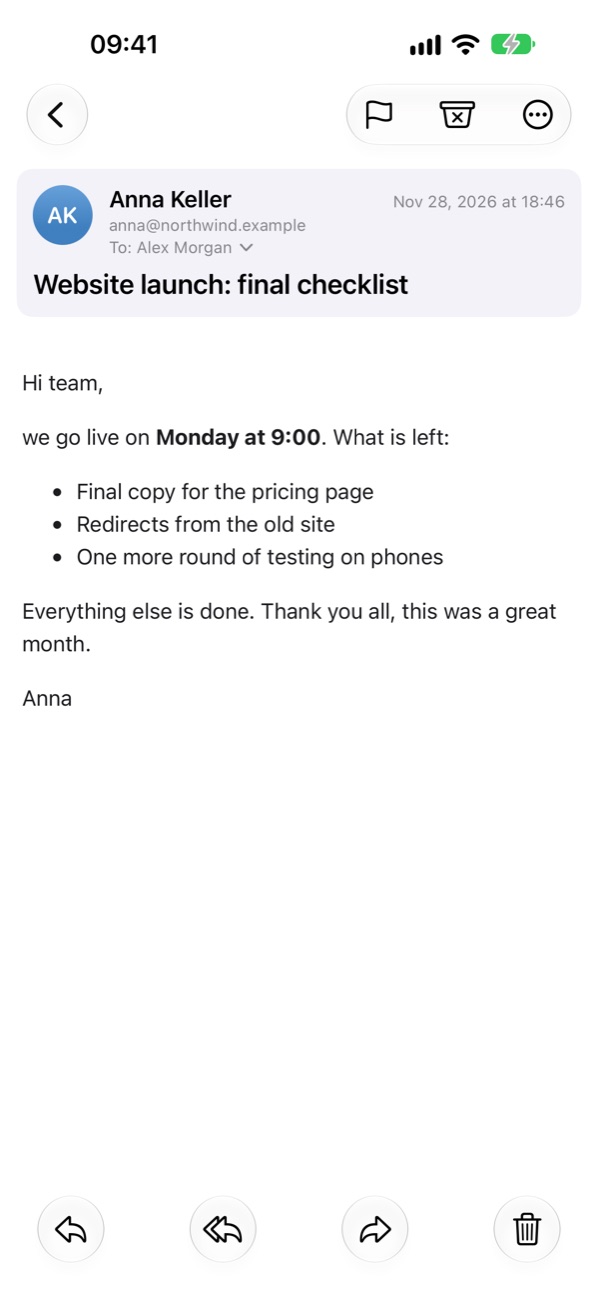
A message open in ArtisMail

Reading that respects you

Conversations are grouped into threads. Remote images stay blocked until you load them, so senders cannot see when you opened a message. Dark mode adapts messages without wrecking their pictures.

  • Threads, pins and VIP senders
  • One-tap Unsubscribe for mailing lists
  • Offline reading, with control over how much is stored
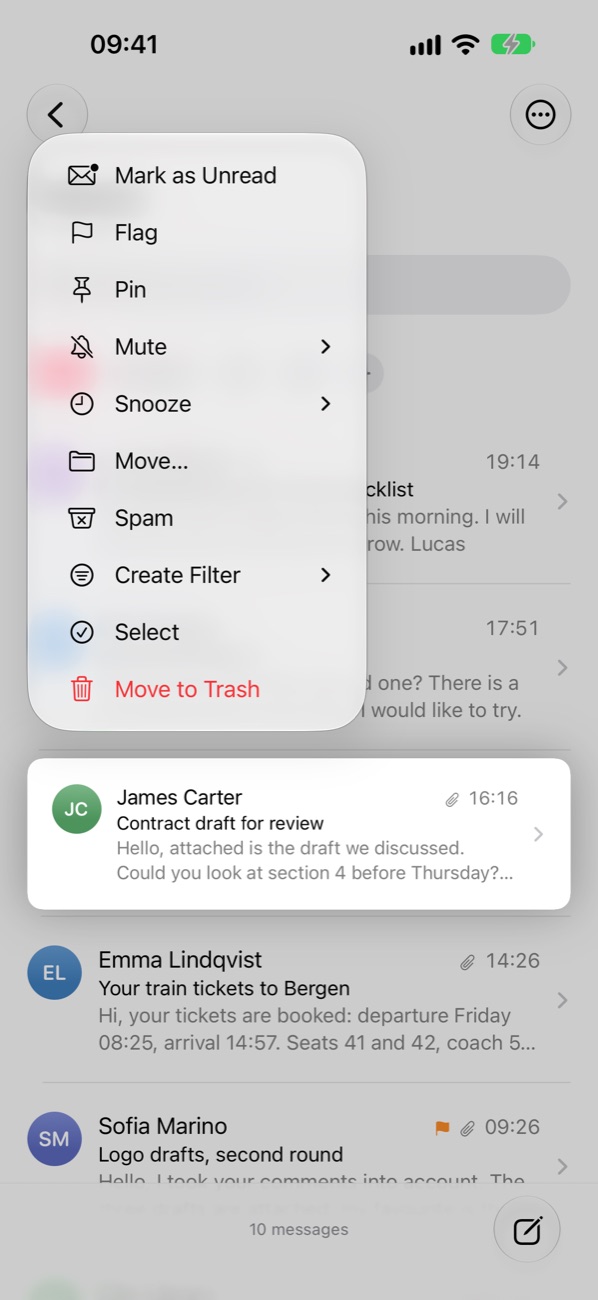
The long-press menu of a message: mark unread, flag, pin, mute, snooze, move, spam, create filter

One long press away

Pin what matters, mute what does not, snooze what can wait and turn any message into a filter. Swipe actions, multi-select and drag-to-select handle the rest of a busy inbox.

  • Snooze until this evening, tomorrow or any date
  • Mute a thread or a sender
  • Create a filter from a message in two taps
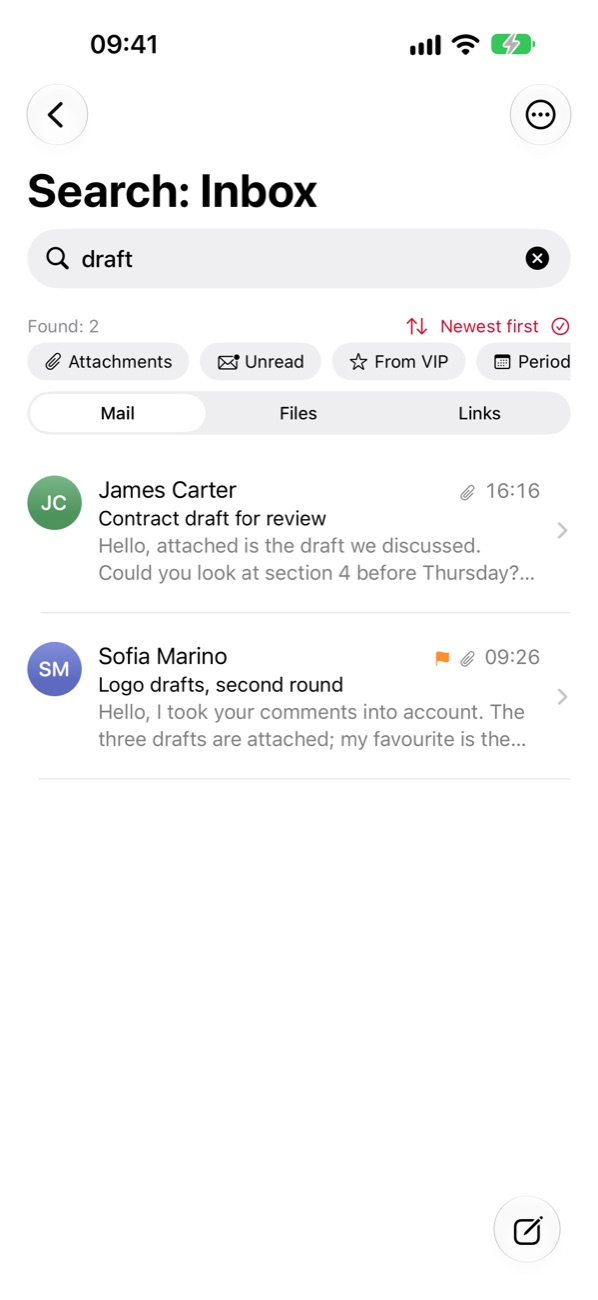
Search results in ArtisMail with chips for attachments, unread, VIP and period

Search that finds it

Search headers or the full text, in one folder or all of them, and narrow the results with chips. An encrypted index on the device makes it fast and keeps it working offline.

  • Mail, files and links as separate result views
  • Filter by attachments, unread, VIP or period
  • The index never leaves the device, not even in iCloud backups
ArtisMail on iPad

iPhone and iPad

One purchase covers both. The same lists, the same gestures, more room.

Every feature, one by one

Nothing here needs an account with us. Features marked Pro are open during the 14-day trial and after a one-time purchase.

Reading

Threads
Messages of one conversation are shown as one row and open as one thread. One switch in Settings turns grouping off.
Remote images blocked
Pictures that live on a sender's server are not loaded until you ask, so nobody learns when or where you opened a message.
Dark mode for messages
In dark mode, message backgrounds and text are darkened while pictures stay as they are. If one message looks wrong, show its original colours.
Attachments
Open attachments and pass them on through the iOS share sheet: save to Files, print or send to another app. A tab shows only the mail that has them.
Calendar invitations
An invitation in a message is recognised and can be added to your calendar with one tap.
Offline reading
Mail you opened or downloaded stays readable without a connection. You choose how far back mail is kept and can clear it at any time.
iPhone and iPad
The same app on both, in portrait and landscape.

Keeping the inbox in order

Swipe actions
Swipe a row one way to mark it read or unread, the other way to move it to a folder or to Trash, without opening it.
Select many at once
Tap to select, or drag a finger down the list to select a run of messages. Select everything a search found, then act on all of it.
Pin
Pinned messages stay at the top of their folder until you unpin them.
Mute
Mute a conversation or a sender. Muted mail does not notify and does not count as unread.
Unsubscribe
For mailing lists that support it, one tap asks the sender to take you off the list. Nothing is contacted before you confirm.
Spam
Mark a message as spam or as not spam; it moves to the right folder on your server.
Folders
Create, rename, move and delete folders, including nested ones. Empty Trash or Spam in one step.
Move suggestions
When you move a message, the folders you usually pick for that sender are offered first.
Auto-clean
Optionally, messages that have sat in Trash or Spam for more than 30 days are deleted for good. Off by default.
Built-in tabs
Above every list: All, Unread, VIP and With attachments, each with its own unread counter.

Search

Headers or full text
Search senders and subjects, or the whole text of messages, in one folder or in all of them.
Works offline
An encrypted index on the device answers at once and keeps working without a connection. The server is asked as well when it is reachable.
Chips to narrow down
Limit results to mail with attachments, unread mail, VIP senders or a period, and sort by newest or oldest.
Files and links
See the attachments or the links from the messages found, as lists of their own.

Writing

Compose, reply, forward
With Cc and Bcc, quoted text, attachments from Files and Photos, and drafts saved to your server as you type.
Recipient suggestions
People you have written to are suggested as you type. With your permission, iOS Contacts are suggested too; they are read on the device and never stored by the app.
Signatures
A signature per account, with an optional logo.
Templates
Keep the texts you send again and again and insert one with two taps.

Notifications

Folders that notify
Choose which folders notify for each account, which matters when a server-side filter files mail away from the Inbox.
VIP senders
Mark the people who matter and, if you like, be notified only about them.
Badge on the icon
Unread mail in the Inbox, in all folders, or no badge at all. With several accounts you pick which ones count.
A sound and a colour per account
Each account can have its own notification sound and its own colour in lists.
Tap to open
Tapping a notification opens that message, with its folder behind it.

Privacy and security

Direct connection only
The app talks to the IMAP and SMTP servers you configure, over TLS, and to nothing else.
Face ID lock
Ask for Face ID or the passcode at launch and on return, at once or after a delay. Mail is hidden in the app switcher, and notifications show who wrote but not what.
Passwords in the Keychain
Kept on this device only, never synced, and shown again only after Face ID.
Encrypted local index
The search index is encrypted and left out of iCloud backups.

ArtisMail Pro

Several accounts Pro
Add all your mailboxes. All Inboxes shows their new mail in one list, each account in its own colour.
Message filters Pro
Rules that move, copy, flag, tag, mark as read, forward or delete incoming mail by sender, subject and more. They run on the phone, and on servers with Sieve also on the server, so mail is sorted while the phone sleeps. A log shows what each filter did.
Snooze Pro
Put a message away until this evening, tomorrow, next week or any date. It comes back unread at the top, with a notification.
Follow-up reminders Pro
When sending, ask to be reminded if nobody replies in one, three or seven days. A reply in any folder of any account clears the reminder.
Your own tabs Pro
Add tabs above the list for the senders, domains or folders you look at most.
Undo Send Pro
After Send, a bar counts down for a few seconds. Tap Undo and the message is back in the composer, unsent.

Private by construction

Most mail apps route your mail through their own servers to add features. ArtisMail does the work on your device instead.

Direct connection

The app talks to your IMAP and SMTP servers over TLS and to nothing else. There is no ArtisMail cloud.

No data collected

No analytics, no crash reporters, no advertising identifiers, no third-party SDKs of any kind.

Passwords stay put

They are kept in the iOS Keychain on this device only and are never synced.

Locked when you want

Face ID lock at launch and on return, with mail hidden in the app switcher and subjects hidden in notifications.

Read the privacy policy

Free to use. Pro when you need more.

Everything in Pro is open for 14 days from the first launch. After that Pro is a one-time purchase: no subscription, nothing to cancel.

Free, for good

  • One mail account
  • Reading, writing and sending
  • Threads, search and offline reading
  • Pins, mute, VIP, notifications
  • Signatures, templates, Face ID lock

Questions

Which mailboxes does it work with?

Any mailbox that offers IMAP and SMTP with a password: your own server, your company's, your hosting provider's. Services that only allow sign-in through their own web page work when they offer an app-specific password.

How fast do notifications arrive?

ArtisMail has no server that could push to your phone, on purpose. iOS wakes the app in the background to check for new mail, typically every 15 to 60 minutes. With the app open, lists refresh by themselves.

What happens after the 14 days?

Reading and sending with one account keeps working without limits. The Pro features wait until you buy Pro. Extra accounts and filters you set up during the trial are kept.

Is Pro really a single payment?

Yes. It is a one-time in-app purchase tied to your Apple Account, restored on a new phone with Restore Purchases.

Where is my mail stored?

On your mail server, as before. The app keeps message headers and the text of messages you opened or downloaded in an encrypted index on the device, so search and offline reading are fast. Settings shows the space used and can clear it.

How do I get help?

See the support page or write to info@artis-media.com.pl.

Mail that stays yours

Download on the App Store